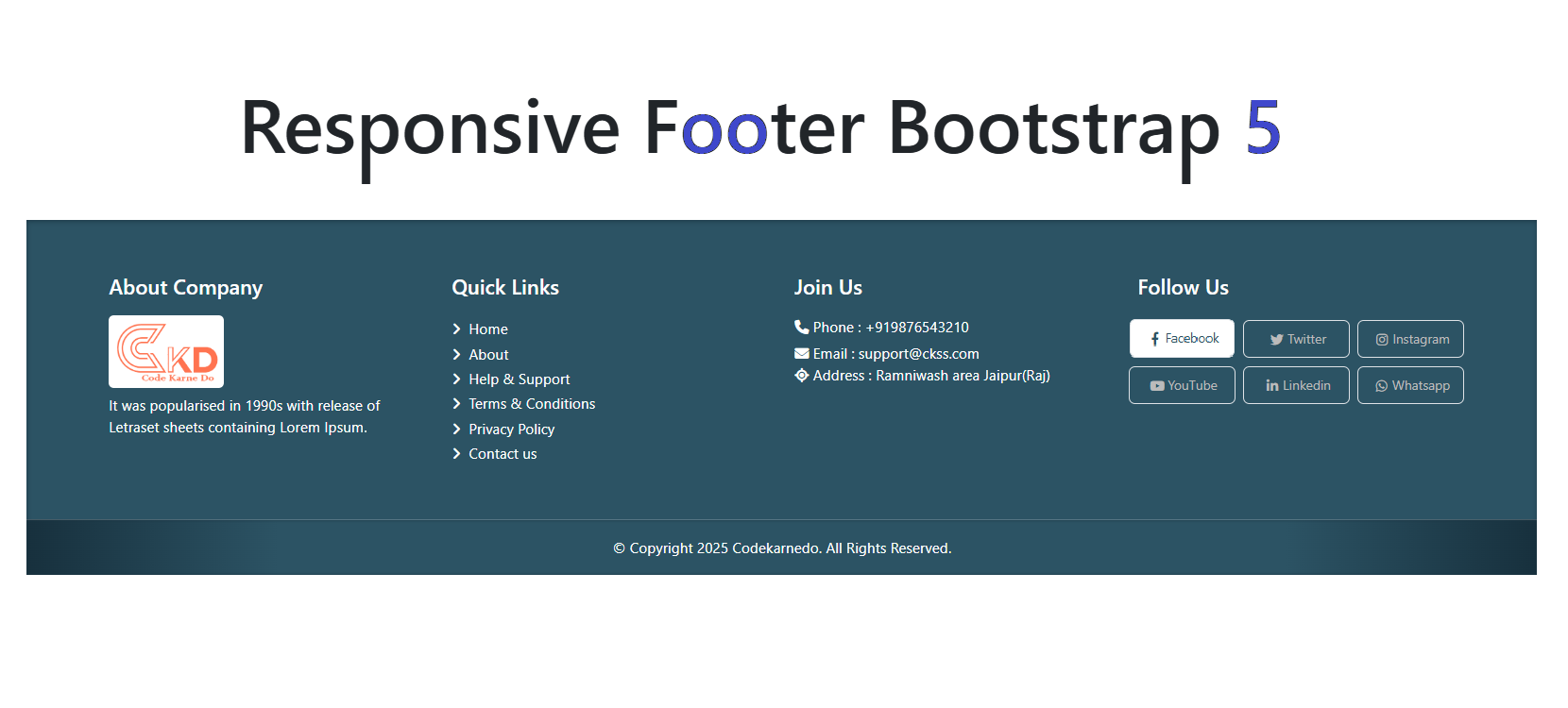
Responsive Footer Bootstrap 5 in (2025-2026)

Responsive Footer Bootstrap 5 in (2025-2026)

Suraj (UI/UX Developer)
Dec 2025

Responsive Footer Bootstrap 5 in (2025–2026): Best Practices & Modern Design Guide

In modern web development, a footer is no longer just a copyright section—it’s a vital part of user experience, navigation, branding, and SEO. With the continued popularity of Bootstrap 5 in 2025–2026, creating a responsive footer that looks great on all devices has become easier, faster, and more efficient.

This blog explores how to design a fully responsive footer using Bootstrap 5, highlights modern trends, and explains best practices you should follow in 2025–2026.

Why a Responsive Footer Matters in 2025–2026

As mobile-first indexing and user experience continue to dominate search engine algorithms, responsive footers are essential. A well-structured footer:

Improves website navigation

Enhances mobile usability

Boosts SEO with internal linking

Builds trust using contact and social links

Supports accessibility standards (WCAG)

Bootstrap 5 provides a flexible grid system and utility classes that make footer responsiveness effortless.

Key Features of Bootstrap 5 Footer

Bootstrap 5 has evolved with performance and flexibility in mind. When designing a footer in 2025–2026, these features stand out:

1. Mobile-First Grid System

Bootstrap 5 uses a flexbox-based grid that adapts perfectly across devices—mobile, tablet, laptop, and desktop.

2. Utility-First Classes

Spacing, alignment, and visibility are handled using utility classes like:

d-flex

justify-content-between

text-center text-md-start

py-4, mt-5

This reduces the need for custom CSS.

3. No jQuery Dependency

Bootstrap 5 completely removed jQuery, making footers lighter, faster, and more compatible with modern JavaScript frameworks.

Essential Footer Sections for Modern Websites

A responsive footer in 2025–2026 should include the following components:

Company or Brand Info

Brief introduction, logo, or tagline that reinforces branding.

Quick Navigation Links

Important internal pages like:

About Us

Services

Blog

Contact

Contact Information

Phone number, email, and location increase credibility and trust.

Social Media Icons

Links to Instagram, LinkedIn, Facebook, GitHub, or X (Twitter) improve engagement.

Newsletter or CTA (Optional)

Email subscriptions or call-to-action buttons help in lead generation.

Best Practices for Responsive Footer Design

Follow these tips to create a future-proof Bootstrap 5 footer:

Use container or container-fluid wisely

Stack columns vertically on small screens

Use semantic HTML (<footer>, <nav>)

Ensure contrast for accessibility

Optimize links for SEO (descriptive anchor text)

Avoid overcrowding the footer area

Bootstrap 5 Footer Design Trends (2025–2026)

Web design trends are evolving, and footers are no exception:

Minimalist layouts

Dark mode footers

Gradient backgrounds

Animated hover effects

Icon-based navigation

AI-powered chat or support links

These trends make footers more interactive and visually appealing without compromising performance.

SEO Benefits of a Well-Structured Footer

A properly optimized footer can significantly improve SEO:

Strengthens internal linking structure

Reduces bounce rate

Helps search engines crawl important pages

Enhances user experience signals

Improves local SEO with address details

Bootstrap 5 makes it easy to structure clean, crawlable HTML—perfect for SEO in 2025–2026.

Conclusion

A responsive footer using Bootstrap 5 is a must-have element for modern websites in 2025–2026. With its mobile-first grid, utility classes, and performance improvements, Bootstrap 5 allows developers to build clean, fast, and SEO-friendly footers with minimal effort.

By following best practices and modern design trends, you can create a footer that not only looks great but also boosts engagement, usability, and search rankings.

HTML

<!DOCTYPE html>
<html lang="en">
  <head>
     <meta charset="UTF-8">
     <meta name="viewport" content="width=device-width, initial-scale=1.0">
     <title>CKD | Responsive ooter Bootstrap 5</title>
     <link rel="stylesheet" type="text/css" href="css/style.css">
     <link href="https://cdn.jsdelivr.net/npm/bootstrap@5.3.2/dist/css/bootstrap.min.css" rel="stylesheet">
     <link href="https://cdnjs.cloudflare.com/ajax/libs/font-awesome/6.4.0/css/all.min.css" rel="stylesheet">
  </head>
  <body>
     <h2 class="text-center">
        Responsive footer Bootstrap 5 in 2026
     </h2>
    <footer class="site-footer">
<div class="container">
<div class="row">

<div class="col-lg-3 col-md-6 my-2">
<h5>About Company</h5>
<img src="https://codekarnedo.com/images/malinLogo.png" class="logo-box">
<p>It was popular Company in 1990s with release of Letraset sheets containing Lorem Ipsum.</p>
</div>

<div class="col-lg-3 col-md-6 my-2">
<h5>Quick Links</h5>
<ul class="footer-links list-unstyled">
<li><a href="#" class="f-link"><i class="fas fa-angle-right"></i> Home</a></li>
<li><a href="#" class="f-link"><i class="fas fa-angle-right"></i> About</a></li>
<li><a href="#" class="f-link"><i class="fas fa-angle-right"></i> Support</a></li>
<li><a href="#" class="f-link"><i class="fas fa-angle-right"></i> Terms</a></li>
<li><a href="#" class="f-link"><i class="fas fa-angle-right"></i> Privacy</a></li>
<li><a href="#" class="f-link"><i class="fas fa-angle-right"></i> Contact</a></li>
</ul>
</div>

<div class="col-lg-3 col-md-6 my-2">
<h5>Contact</h5>
<p><i class="fa fa-phone"></i> +919876543210</p>
<p><i class="fa fa-envelope"></i> support@ckss.com</p>
<p><i class="fa fa-location"></i> Jaipur Rajasthan</p>
</div>

<div class="col-lg-3 col-md-6 my-2">
<h5>Follow Us</h5>

<div class="row social-box box">

<a class="col-6 p-1" href="#">
<div class="social-btn border p-2 rounded">
<i class="fab fa-facebook-f"></i> Facebook
</div>
</a>

<a class="col-6 p-1" href="#">
<div class="social-btn border p-2 rounded">
<i class="fab fa-instagram"></i> Instagram
</div>
</a>

<a class="col-6 p-1" href="#">
<div class="social-btn border p-2 rounded">
<i class="fab fa-youtube"></i> YouTube
</div>
</a>

<a class="col-6 p-1" href="#">
<div class="social-btn border p-2 rounded">
<i class="fab fa-linkedin"></i> Linkedin
</div>
</a>

</div>

</div>

</div>
</div>

<div class="footer-bar text-center">
<div class="container">
<p class="mb-0">All Rights Reserved</p>
</div>
</div>

</footer>
     <script src="https://cdn.jsdelivr.net/npm/bootstrap@5.3.2/dist/js/bootstrap.bundle.min.js"></script>
  </body>
</html>

CSS

.site-footer {
background:#1f3a45;
color:#ffffff;
box-shadow:0px 1px 5px 0px #0f232b inset;
padding-top:3rem;
}

.site-footer a{
color:#cfcfcf;
text-decoration:none;
transition:.5s;
}

.site-footer a:hover{
color:#1f3a45;
}

.social-box .box a{
display:inline-block;
margin-right:10px;
padding:5px 10px;
border:1px solid #444;
border-radius:5px;
transition:.3s;
}

.social-box .box a:hover{
background:#16a085;
color:#fff;
border-color:#16a085;
}

.footer-bar{
border-top:1px solid rgba(255,255,255,0.2);
padding:1rem 0;
background:linear-gradient(90deg,#0f232b,#1f3a45,#1f3a45,#1f3a45,#0f232b);
box-shadow:0px 0px 3px 0px #0f232b inset;
margin-top:2rem;
}

.social-btn{
display:flex;
justify-content:center;
font-size:12px;
align-items:center;
transition:.3s;
}

.social-btn:hover{
background:#fff;
}

.social-btn i{
width:20px;
height:11px;
font-size:13px;
text-align:center;
transform:rotate(-360deg);
}

.social-btn:hover i{
transform:rotate(0deg);
transition:.6s;
}

ul.footer-links li a.f-link{
transition:.3s;
position:relative;
left:0;
color:#fff !important;
font-size:14px;
}

ul.footer-links li:hover a.f-link{
left:4px;
}

.logo-box{
height:70px;
background:#fff;
border-radius:5px;
padding:5px;
margin-bottom:5px;
width:auto;
}